RVMedia VCL/LCL v12.0 for D7-13 Full Source
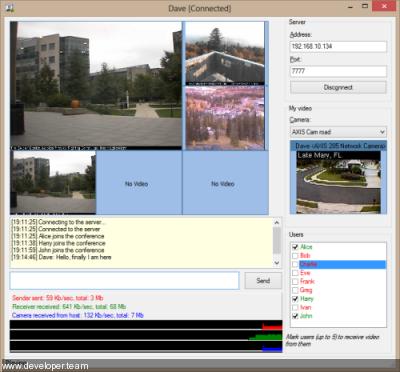
Download RVMedia VCL/LCL v12.0 for D7-13 Full Source
RVMedia is a set of Delphi (VCL and FireMonkey) and Lazarus (LCL) components having the following functions:
receiving video from different sources: local web cameras, IP cameras, network video streams, computer desktop, local and remote video files;
configuring IP cameras and controlling their rotation;
reading sound from a microphone;
sending and receiving video and audio data via the Internet;
recording audio and video files;
organizing video chats and video conferences (either as directly connected applications or using a client-server model).
RVMedia can use GStreamer and FFmpeg libraries to show video streams in advanced formats, such as H.264.
Note: RVMedia does not include neither a source code nor an object code of these libraries. Copyright to GStreamer and FFmpeg belongs to the respective owners. RVMedia uses them under GNU LGPL license v2.1.
Delphi and C++Builder (VCL and FireMonkey) versions of RVMedia support only Windows platform. More platforms will be added in future.
RVMedia Components
Video
TRVCamera – component for receiving video from different sources: local USB camera, remote IP camera, video file, screen, HTTP or RTSP stream
TRVCamControl – visual component for controling camera movement (rotation)
TRVCamView – visual component for displaying video from TRVCamera or TRVCamReceiver
TRVCamMultiView – visual component for displaying videos from multiple sources
TRVCamRecorder – component for recording audio and video files
TRVWebCamDialog – component for displaying a dialog window for editing local web camera properties
Sound
TRVMicrophone – component for reading sound from microphones (or other local audio input devices); sound can be played or recorded using TRVAudioPlayer or sent to the network using TRVCamSender
TRVMicrophoneView – visual component showing a microphone activity
TRVAudioPlayer – component for playing sound and recording audio files
Network
TRVCamSender – component for sending video (from TRVCamera or TRVCamReceiver) and/or audio (from TRVMicrophone or TRVCamReceiver) to TRVCamReceiver or TRVMediaServer via the network
TRVCamReceiver – component for receiving video and audio (from TRVCamSender or TRVMediaServer) via the network
TRVMediaServer – component for sending data (video, audio, commands, files) from multiple TRVCamSenders to multiple TRVCamReceivers via the network
TRVTrafficMeter – visual component for displaying traffic charts and statistics
Version 12 (Delphi 13, FFmpeg 8, speech to text (Whisper))
|
RAD Studio 13 Florence Delphi and C++Builder 13 are supported. RAD Studio 12.3 Athens 64-bit RAD Studio IDE is supported (for installation of Delphi+CBuilder packages). FFmpeg •FFmpeg versions 8 is supported, so RVMedia can use FFmpeg versions from 1 to 8. •FFmpeg 8 includes Whisper (speech recognition and transcription AI model developed by OpenAI). It is supported by RVMedia, see below. •Streaming: To start MPEG-TS streaming instead of file recording, assign a udp:// or srt:// URL to either TRVCamRecorder.OutputFileName or TRVCamera.FFmpegProperty.RemuxProperty.FileName. •Remuxing: additional property for remuxing (saving to a file or streaming without changing video and audio formats): TRVCamera.FFmpegProperty.Remuxing2: TRVFFmpegRemuxProperty. You can use Remuxing and Remuxing2 independently from each other (for example, one for recording, another one for streaming). •Recording/streaming: an option to initialize in a background thread, new TRVCamRecorder.OnActiveChanged event. Whisper (speech to text) RVMedia can use a Whisper version included in FFmpeg 8+ for speech recognition. •TRVCamera can recognize speech in videos received using FFmpeg. New property FFMpegProperty.SpeechToText, new event OnSpeechRecognized. •TRVAudioPlayer can recognize speech in audio data from various sources. New property SpeechToTextProperty, new event OnSpeechRecognized. GStreamer You can specify frame rate (for video sources that support it). New property TRVCamera.GStreamerProperty.UseFramePerSec. Local cameras Frame decoding on Windows and Linux has been significantly optimized, reducing CPU usage and, in some cases, increasing the frame rate. On Linux, MJPEG modes for local cameras are supported (these are typically more efficient than other camera modes). Error handling The error handling mechanism for video receiving and recording has been revised. The result is accessible to the developer via TRVCamera.onerror, TRVCamRecorder.onerror, TRVAudioPlayer.onerror events. Lazarus The separation of runtime and designtime packages for Lazarus has been removed: instead of the two packages, rvmedialaz.dpk (runtime) and rvmedialaz_dsgn.lpk (designtime), there is now a single package, rvmedialaz.dpk (runtime + designtime). |