VeryPDF PDFEditor OCX v4.0.2.1
Download VeryPDF PDFEditor OCX v4.0.2.1
VeryPDF PDF Editor OCX Control is a powerful ActiveX control to automatically create PDF files from image files and any printable files and edit PDF files in various properties flexibly, Word documents, Powerpoint files, image files and text files. VeryPDF PDF Editor OCX Control is a special-purpose program that can be used to create other applications containing features of VeryPDF PDF Editor in various platforms.
VeryPDF PDF Editor OCX Control provides such functions as handling scroll bar movement and window resizing when you create PDF files from image files and any printable files and edit PDF files in various properties flexibly.
Operating Systems
All the Windows platforms, like Windows 2000, XP, Vista, 7, 10, 11, Windows Server 2003, 2008, 2008 R2 and later systems, both 32 bit and 64 bit
Supported Programming Languages
C#, VB .NET, MS Visual Basic, Borland Delphi, VBA (MS Office products such as Access) and C++ via COM, C and C++ via native C
Register
Open Command Prompt in your computer, then, type regsvr32 there and call pdfocx.ocx in your computer, and then, a window pops on screen, indicating your successful registration.
The following command line is example registration steps for you to refer to:
regsvr32 D:\pdfeditor_ocx\bin\pdfocx.ocx
Run
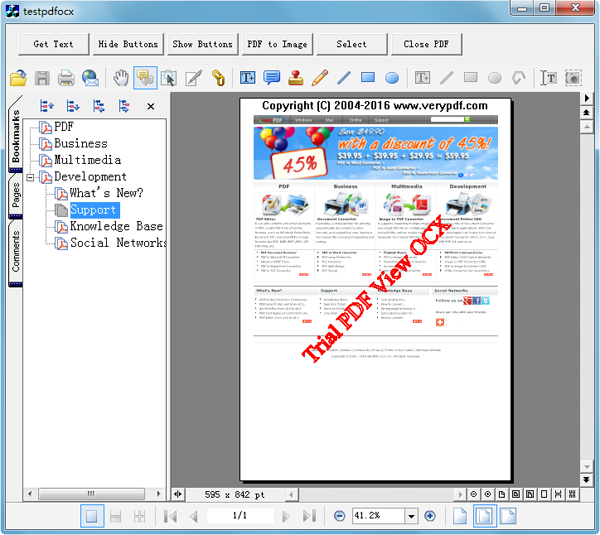
After registration, testpdfocx.exe is free to run in order to run VeryPDF PDF Editor OCX Control.
Sample: Visual Basic

VeryPDF PDF Editor OCX Control can be applied in VB in this way:

Private Sub Form_Load()

    Pdfocx1.SetOrderID "XXXXXXXXXXXXXXX", "Your company name", "Your     email address"

    Pdfocx1.ShowToolbar True

End Sub

Sample: C#

VeryPDF PDF Editor OCX Control can be applied in C# in this way:

using System;

using System.Collections.Generic;

using System.ComponentModel;

using System.Data;

using System.Drawing;

using System.Text;

using System.Windows.Forms;


namespace WindowsApplication3

{

    public partial class Form1 : Form

    {

        public Form1()

        {

            InitializeComponent();

        }

        private const string veryPDFOCXRegistrationCode =
          "XXXXXXXXXXXXXX";

        private void Form1_Load(object sender, EventArgs e)

        {

            axPdfocxMarkup.SetOrderID(veryPDFOCXRegistrationCode,
            null, null);


            axPdfocxMarkup.MainToolbarHideButton(32772, true);

            axPdfocxMarkup.MainToolbarHideButton(32774, true);

            axPdfocxMarkup.MainToolbarHideButton(32773, true);

            axPdfocxMarkup.MainToolbarHideButton(32776, true);

            axPdfocxMarkup.MainToolbarHideButton(32777, true);

            axPdfocxMarkup.MainToolbarHideButton(32778, true);

            axPdfocxMarkup.MainToolbarHideButton(32779, true);


            axPdfocxMarkup.MainToolbarHideButton(32877, true);

            axPdfocxMarkup.MainToolbarHideButton(32878, true);

            axPdfocxMarkup.MainToolbarHideButton(32787, true);

            axPdfocxMarkup.MainToolbarHideButton(32788, true);

            axPdfocxMarkup.MainToolbarHideButton(32789, true);


            axPdfocxMarkup.MainToolbarHideButton(32790, true);

            axPdfocxMarkup.MainToolbarHideButton(32791, true);

            axPdfocxMarkup.MainToolbarHideButton(32792, true);

            axPdfocxMarkup.MainToolbarHideButton(32793, true);


            tabControl1.SelectedTab = tabPage2;

        }


        private void button1_Click(object sender, EventArgs e)

        {

            OpenFileDialog openExtensFile = new OpenFileDialog();

            openExtensFile.Title = "PDF";

            openExtensFile.InitialDirectory = @"c:\";

            openExtensFile.Filter =

            "PDF Files (*.pdf)|*.pdf|All Files (*.*)|*.*";

            openExtensFile.FilterIndex = 0;

            openExtensFile.RestoreDirectory = true;

            if (openExtensFile.ShowDialog() != DialogResult.OK)

            {

                return;

            }

            bool bRet = axPdfocxMarkup.OpenPDFFile(
            openExtensFile.FileName, "", "", 0);

            axPdfocxMarkup.ShowLeftPanel(true);

            int refPara = 0;

            axPdfocxMarkup.InvokeMethod(42, 1, ref(refPara));

            string strDefaultFolder = "c:\\windows";

            //axPdfocxMarkup.InvokeMethodEx(229, 1,
            //strDefaultFolder);

        }


        private void button2_Click(object sender, EventArgs e)

        {

            int nModify = 0;

            axPdfocxMarkup.InvokeMethod(71, 0, ref(nModify));

            if (nModify != 0)

            {

                MessageBox.Show("PDF file has been modified!");

            }

            axPdfocxMarkup.ClosePDFFile();

        }


        private void Form1_Resize(object sender, EventArgs e)

        {

            tabControl1.Height = this.Height - 100;

            tabControl1.Width = this.Width - 2 * tabControl1.Left;

        }

    }

}