Jasi PE Builder v1.0 - Memory Dump to Valid Disk PE Rebuilder
Download Jasi PE Builder v1.0 - Memory Dump to Valid Disk PE Rebuilder
JasiPEBuilder is a command-line tool for reconstructing valid executable PE files from raw memory dumps produced by JasiNativeDumper or any other dumper that captures a flat SizeOfImage byte copy of a loaded module. It handles the full pipeline of transformations needed to turn a dump that the Windows loader can map back into a file that tools like IDA Pro, Ghidra, x64dbg, CFF Explorer and DetectitEasy can open cleanly.
It fixes section raw offsets (aligning PointerToRawData and SizeOfRawData to match the flat memory layout), recalculates SizeOfImage, SizeOfHeaders and the file checksum, strips stale debug and bound import directories, and rebuilds the import table from scratch. Import reconstruction reads the original DLL files from System32 and SysWOW64 on the current machine to reverse-resolve IAT slot values back to function names, then writes a fresh .idata section with valid IMAGE_IMPORT_DESCRIPTOR chains, IMAGE_IMPORT_BY_NAME entries, and correct ordinal thunks. It handles targets compiled with MSVC (via the original INT), Delphi and MinGW (no INT, pre-init IBN-RVA path), and running-process dumps (VA to export map lookup). Delay imports are sanitized so stale runtime pointers do not crash the rebuilt image on load. Base relocations can be kept intact for ASLR rebasing or stripped for fixed-base analysis and supports both PE32 (x86) and PE32+ (x64) targets.
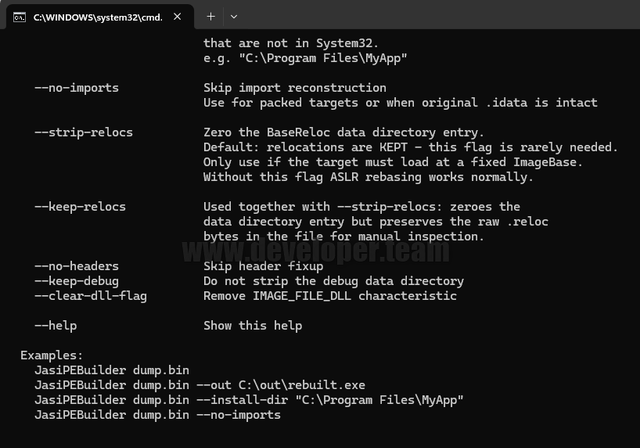
Usage: JasiPEBuilder <dump.bin> [options]
Arguments:
<dump.bin> Raw PE memory dump file to rebuild
Options:
--out <file> Full output file path including filename
Default: <dump_name>_rebuilt.exe next to the dump
--install-dir <path> Path to the original installed directory of the target app used to find third-party DLLs like zlib,
custom SDKs, etc. that are not in System32.
e.g. "C:\Program Files\MyApp"
--no-imports Skip import reconstruction
Use for packed targets as they are resolved at runtime by packer or when original .idata is intact
--strip-relocs Zero the BaseReloc data directory entry.
Default: relocations are KEPT - this flag is rarely needed.
Only use if the target must load at a fixed ImageBase or for static analysis at fixed address.
Without this flag ASLR rebasing works normally, or use if target had no .reloc section to begin with.
--keep-relocs Used together with --strip-relocs: zeroes the data directory entry but preserves the raw .reloc
bytes in the file for manual inspection.
--no-headers Skip header fix-ups like SizeOfImage, SizeOfHeaders, checksum, debug directory, and bound import directory
are left as it is in dump.
--keep-debug Do not strip the debug data directory
--clear-dll-flag Remove IMAGE_FILE_DLL in FileHeader.Characteristics
--help Show this help
Examples:
JasiPEBuilder dump.bin
JasiPEBuilder dump.bin --out C:\out\rebuilt.exe
JasiPEBuilder dump.bin --install-dir "C:\Program Files\MyApp"
JasiPEBuilder dump.bin --no-imports
Notes:
-> Use --install-dir <path> to resolve third-party DLLs (e.g. zlib, custom SDKs) that are not in System. Without it, imports from those DLLs cannot be resolved and their IAT slots are zeroed. The rebuilt exe will still load but any call through an unresolved slot will crash at runtime.
-> Use --no-imports for packed (Themida, VMProtect, etc.) targets as real IAT is managed by the protector at runtime. Rebuilding imports on a protected dump produces garbage that interferes with the protector's own loader
Changelog:
v1.0 (03/Jun/2026)
- Initial Release
Download Jasi PE Builder v1.0 - Memory Dump to Valid Disk PE Rebuilder
Attention! You do not have permission to view the hidden text.
Platinum or VIP Members can Download this file. Not a member? Join now or upgrade your plan!