blocks » Page 11 » Custom Developer Tools and VCL Components | Developer Team

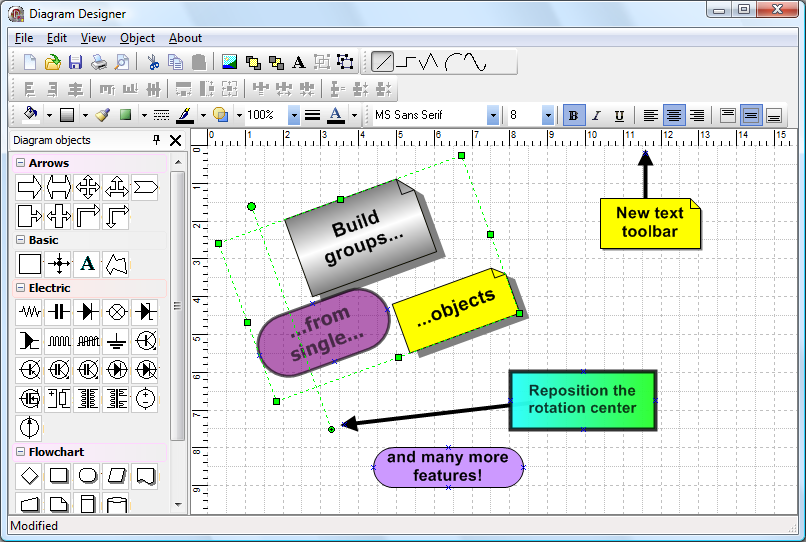
TMS Diagram Studio v4.18 Full Source

TMS Diagram Studio v4.18 Full Source


Add diagram and flowchart capabilities to your application.

Feature overview

Diagram editing behaviour similar to standard diagramming applications
Ready-to-use Visio-like look and feel diagram editor
High-quality (anti-aliasing) drawing of blocks and lines
Blocks and lines can have transparency
BMP, WMF, EMF, PNG, TIFF, GIF and JPG images supported in blocks
Read more

Task Canvas 2.0.0

Task Canvas 2.0.0
Task Canvas 2.0.0


The Task Canvas window is closed automatically when you close the solution. If you try to close the Task Canvas window manually, the confirmation dialog is displayed. Technically, the Task Canvas window is a document tab and when you, for example, run the Close All Documents command, Visual Studio tries to close the Task Canvas window as well. This dialog prevents such accidental closing. On the other hand, if you frequently open and close the Task Canvas window manually, you may want to disable this confirmation by unchecking the Confirm before closing option. window manually, you may want to disable this confirmation by unchecking the Confirm before closing option.

Read more

TMS FNC Blox 1.0.2.5 XE7-D10.2 Tokyo

TMS FNC Blox 1.0.2.5 XE7-D10.2 Tokyo


High-quality (anti-aliasing) drawing of blocks and lines
Open architecture for building custom blocks and lines inherited from base classes
Ready-to-use flowchart, arrow and electric blocks
Linking system allow customizable link points and information retrieval of connected blocks
Block gradient, shadow and bitmap
Read more

TMS FNC Blox 1.0.2.4 XE7-XE11

TMS FNC Blox 1.0.2.4 XE7-XE11


High-quality (anti-aliasing) drawing of blocks and lines
Open architecture for building custom blocks and lines inherited from base classes
Ready-to-use flowchart, arrow and electric blocks
Linking system allow customizable link points and information retrieval of connected blocks
Block gradient, shadow and bitmap
Full block customization: pen, brush, color, selection color, minimum width and height
Block text customization: horizontal and vertical alignment, font, word wrap, clipping
Customizable link points in blocks
Full line (link) customization: pen, source arrow shape, target arrow shape
Arc & bezier lines, polygon objects
Read more

TMS FNC Blox 1.0.2.3 XE7-XE11

TMS FNC Blox 1.0.2.3 XE7-XE11


High-quality (anti-aliasing) drawing of blocks and lines
Open architecture for building custom blocks and lines inherited from base classes
Ready-to-use flowchart, arrow and electric blocks
Linking system allow customizable link points and information retrieval of connected blocks
Block gradient, shadow and bitmap
Full block customization: pen, brush, color, selection color, minimum width and height
Block text customization: horizontal and vertical alignment, font, word wrap, clipping
Read more

V3S - VHDL, Verilog, SystemVerilog for VS v2.0.2

V3S - VHDL, Verilog, SystemVerilog for VS v2.0.2


What is V3S?
VВіS is an extension for Microsoft's most excellent Visual Studio. It enables programmers to use Visual Studio as code editor for VHDL (and Verilog/SystemVerilog) projects. Following the rich feature set of the C# programming language, V3S offers many useful functions for efficiently coding in VHDL (or Verilog/SystemVerilog).
Read more

TMS Diagram Studio 4.16 D2009-XE10.2

TMS Diagram Studio 4.16 D2009-XE10.2


Add diagram and flowchart capabilities to your application.

Feature overview

Diagram editing behaviour similar to standard diagramming applications
Ready-to-use Visio-like look and feel diagram editor
High-quality (anti-aliasing) drawing of blocks and lines
Blocks and lines can have transparency
BMP, WMF, EMF, PNG, TIFF, GIF and JPG images supported in blocks
Open architecture for building custom blocks and lines inherited from base classes
Ready-to-use flowchart, arrow and electric blocks
Diagram printing and previewing
Read more

TMS Diagram Studio 4.15 D7-D10.2 Tokyo

TMS Diagram Studio 4.15 D7-D10.2 Tokyo


Add diagram and flowchart capabilities to your application.

Feature overview

Diagram editing behaviour similar to standard diagramming applications
Ready-to-use Visio-like look and feel diagram editor
High-quality (anti-aliasing) drawing of blocks and lines
Blocks and lines can have transparency
BMP, WMF, EMF, PNG, TIFF, GIF and JPG images supported in blocks
Open architecture for building custom blocks and lines inherited from base classes
Ready-to-use flowchart, arrow and electric blocks
Read more