scrollbar » Custom Developer Tools and VCL Components | Developer Team

SlickEdit Pro 2023 28.0.2 x86/x64

SlickEdit Pro 2023 28.0.2 x86/x64


Build and debug large or complex projects. Stay in sync with version control integration and powerful file differencing tools. All your project's symbols are tagged for quick and easy lookup, analysis, and navigation. Whichever edition you choose, enjoy fast startup, smart editing features, and increased productivity.
Read more

Parnassus Bookmarks/Core Editor 1.6.4 for RS 12 from October 27, 2023

Parnassus Bookmarks/Core Editor 1.6.4 for RS 12 from October 27, 2023


Ever wanted to jump to the uses clause, to a class’s constructor, to a property definition? Navigator lets you move between any section of code quickly, easily, and without your fingers leaving the keyboard. There’s also a minimap – a miniature version of your code, showing the structure and letting you scroll just like a scrollbar.
Read more

Parnassus Core Editor/Navigator 1.6.4 for RS 12 from October 27, 2023

Parnassus Core Editor/Navigator 1.6.4 for RS 12 from October 27, 2023


Ever wanted to jump to the uses clause, to a class’s constructor, to a property definition? Navigator lets you move between any section of code quickly, easily, and without your fingers leaving the keyboard. There’s also a minimap – a miniature version of your code, showing the structure and letting you scroll just like a scrollbar.
Read more

RAD Studio 10.3.3 IDE and VCL Patch

RAD Studio 10.3.3 IDE and VCL Patch


IDE and VCL Patch
This patch addresses the following issues:

RSP-26731 Code completion popup leaves scroll bar window floating
When the code completion window was dismissed by changing the active window (such as compiling to show the Compile dialog), the scrollbar for the window remained onscreen until the completion window was shown again.
Read more

Parnassus Bookmarks & Navigator 1.6.0.0

Parnassus Bookmarks & Navigator 1.6.0.0


Ever wanted to jump to the uses clause, to a class’s constructor, to a property definition? Navigator lets you move between any section of code quickly, easily, and without your fingers leaving the keyboard. There’s also a minimap – a miniature version of your code, showing the structure and letting you scroll just like a scrollbar.
Read more

TRichView ScaleRichView v8.2 Full Source

TRichView ScaleRichView v8.2 Full Source


ScaleRichView is a set of VCL components for WYSIWYG editing (“What You See Is What You Get”), created basing on TRichView and RichViewActions. ScaleRichView uses TRichView engine for document rendering, but it repaginates, scales and draws pages in its own way. A document in ScaleRichView is accessible via hidden (or external) TRichViewEdit component, so you can use the same methods for document generation and editing as you use in TRichView. Headers, footers, endnotes, footnotes and text boxes are accessible in a similar way.
Read more

ScaleRichView 7.2.3 Full Source

ScaleRichView 7.2.3 Full Source
ScaleRichView 7.2.3 Full Source | 11 Mb


ScaleRichView is a set of VCL components for WYSIWYG editing (“What You See Is What You Get”), created basing on TRichView and RichViewActions. ScaleRichView uses TRichView engine for document rendering, but it repaginates, scales and draws pages in its own way. A document in ScaleRichView is accessible via hidden (or external) TRichViewEdit component, so you can use the same methods for document generation and editing as you use in TRichView. Headers, footers, endnotes, footnotes and text boxes are accessible in a similar way.
Read more

Parnassus Navigator v1.0 C++ Builder, Delphi XE3-XE8 Plugin

Parnassus Navigator v1.0 C++ Builder, Delphi XE3-XE8 Plugin
Parnassus Navigator v1.0 C++ Builder, Delphi XE3-XE8 Plugin | 6 Mb


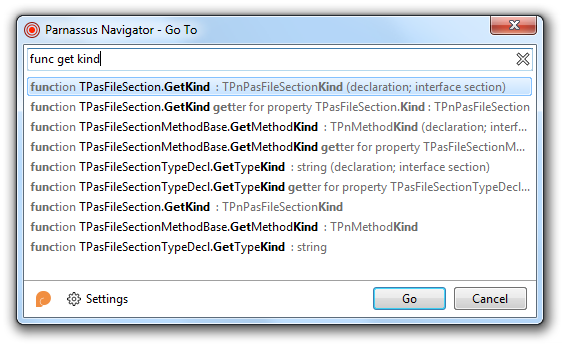
Ever wanted to jump to the uses clause, to a class’s constructor, to a property definition? Navigator lets you move between any section of code quickly, easily, and without your fingers leaving the keyboard. There’s also a minimap – a miniature version of your code, showing the structure and letting you scroll just like a scrollbar. Navigator lists all unit sections (uses, interface, implements, type, const…), types (classes, records, interfaces, enums, sets…), methods, fields, and properties in each type, and standalone methods.* It even shows property getters and setters as you type the property name. It can be invoked by either mouse or keyboard, which means you can move somewhere in your code without breaking your workflow. It’s fast, efficient, and designed for real work.
Read more